


删除数据
当有返回值时 返回值为影响的行数
@Mapper
public interface EmpMapper {
    @Delete("delete from emp where id =#{id}")
    public void Delete(Integer id);
}
@SpringBootTest
class SpringbootMybatisCrudApplicationTests {
@Autowired
private EmpMapper empMapper;
@Test
public void testDelete(){
empMapper.Delete(17);
}
}新增数据
@Mapper
public interface EmpMapper {
@Insert("insert into emp (" +
        "username, name, gender, image, job, entrydate, dept_id, create_time, update_time) value (" +
        "#{username},#{name},#{gender},#{image},#{job},#{entrydate},#{deptId},#{createTime},#{updateTime})")
    public void insert(Emp emp);
}
@SpringBootTest
class SpringbootMybatisCrudApplicationTests {
@Autowired
private EmpMapper empMapper;
@Test
public void testInsert(){
Emp emp=new Emp();
emp.setUsername("yujian");
emp.setName("遇见");
emp.setPassword("123456");
emp.setImage("");
emp.setGender((short) 1);
emp.setJob((short) 1);
emp.setEntrydate(LocalDate.of(2023,5,8));
emp.setCreateTime(LocalDateTime.now());
emp.setUpdateTime(LocalDateTime.now());
emp.setDeptId(1);
empMapper.insert(emp);
}
}新增数据(主键返回)
@Mapper
public interface EmpMapper {
  @Options(useGeneratedKeys = true,keyProperty = "id") //会自动将生成的主键值赋值给emp对象的id属性
@Insert("insert into emp (" +
        "username, name, gender, image, job, entrydate, dept_id, create_time, update_time) value (" +
        "#{username},#{name},#{gender},#{image},#{job},#{entrydate},#{deptId},#{createTime},#{updateTime})")
    public void insert(Emp emp);
}
更新数据
@Mapper
public interface EmpMapper {
    @Update("update emp set username=#{username},name=#{name} where id=#{id}")
    public void update(Emp emp);
}
@SpringBootTest
class SpringbootMybatisCrudApplicationTests {
@Autowired
private EmpMapper empMapper;
@Test
public void testUpdate(){
Emp emp=new Emp();
emp.setId(18);
emp.setUsername("id18");
emp.setName("遇见");
empMapper.update(emp);
}
}查询(根据ID查询)
@Mapper
public interface EmpMapper {
    @Select("select *  from emp where id=#{id}")
    public Emp getById(Integer id);
}
@SpringBootTest
class SpringbootMybatisCrudApplicationTests {
@Autowired
private EmpMapper empMapper;
@Test
public void testGetById(){
Emp emp=empMapper.getById(18);
System.out.println(emp);
}
}有三个字段为空 原因查看下面的数据封装
Emp(id=18, username=id18, password=123456, name=遇见, gender=1, image=, job=1, entrydate=2023-05-08, deptId=null, createTime=null, updateTime=null)
数据封装
实体类属性名 和 数据库表查询返回的字段名一致,mybatis会自动封装。
如果实体类属性名 和 数据库表查询返回的字段名不一致,不能自动封装。
起别名
给字段起别名 使别名与实体类的属性名一致
@Select("select id, username, password, name, gender, image, job, entrydate, dept_id deptId, create_time createTime, update_time updateTime from emp where id = #{id} ")
  public Emp getById(Integer id);
手动映射结果
使用 注解@Results @Result映射封装
    @Results({
            //column 数据库字段名
            //property实体类属性名
            @Result(column = "",property = ""),
            @Result(column = "",property = "")
    })
    @Select("select *  from emp where id=#{id}")
    public Emp getById(Integer id);
开启驼峰命名
如果字段名与属性名符合驼峰命名规则,mybatis会自动通过驼峰命名规则映射。
开启驼峰命名自动映射,即从数据库字段名 a_column 映射到Java 属性名 aColumn。
mybatis.configuration.map-underscore-to-camel-case=true
SQL代码
create table emp (
     id int unsigned primary key auto_increment comment 'ID',
     username varchar(20) not null unique comment '用户名',
     password varchar(32) default '123456' comment '密码',
     name varchar(10) not null comment '姓名',
     gender tinyint unsigned not null comment '性别, 说明: 1 男, 2 女',
     image varchar(300) comment '图像',
     job tinyint unsigned comment '职位, 说明: 1 班主任,2 讲师, 3 学工主管, 4 教研主管, 5 咨询师',
     entrydate date comment '入职时间',
     dept_id int unsigned comment '部门ID',
     create_time datetime not null comment '创建时间',
     update_time datetime not null comment '修改时间'
) comment '员工表';
Emp类
@Data
@NoArgsConstructor
@AllArgsConstructor
public class Emp {
    private Integer id;
    private String username;
    private String password;
    private String name;
    private Short gender;
    private String image;
    private Short job;
    private LocalDate entrydate;
    private Integer deptId;
    private LocalDateTime createTime;
    private LocalDateTime updateTime;

}
查询(条件查询)
@Mapper
public interface EmpMapper {
    @Select("select *  from emp where name like'%${name}%'")
    public List<Emp> List(String name);
}
@SpringBootTest
class SpringbootMybatisCrudApplicationTests {
@Autowired
private EmpMapper empMapper;
@Test
public void list(){
System.out.println(empMapper.List("遇"));
}
}SQL语句中 如果使用%#{name}% 会预编译成 %?% 从而执行失败
所以用$替代 ¥符是字符拼接符号 他不会生成预编译SQL
但是 没有进行预编译 会有两个问题(性能低 不安全) 所以 可以用到MySQL的concat函数(字符拼接函数)实现 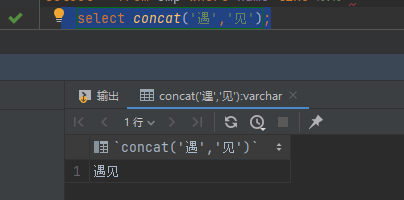
查询的条件 可以理解成 两个%与关键字组成(%关键字%) 因此 查询语句 可以替换成 select * from emp where name like concat('%',#{name},'%')
配置输出日志
mybatis.configuration.log-impl=org.apache.ibatis.logging.stdout.StdOutImpl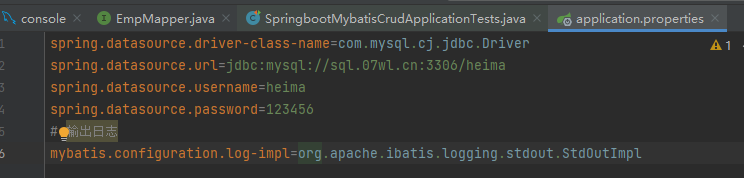
id=? ?表示参数占位符
Parameters:17 参数17
updates:0表示影响的记录数为0 
预编译SQL
优势
1. 性能更高 执行SQL语句时都会执行以下4个流程 如果进行预编译 会将已经执行过的SQL语句模板放入缓存中 下次执行时直接从缓存中获取模板语句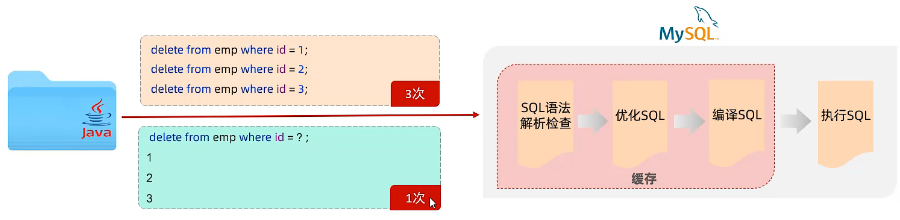
2. 更安全(防SQL注入) SQL注入解释
参数占位符说明
SQL语句中 参数使用 #{} 花括号内填写参数名,只有一个参数时 参数名可以随意填写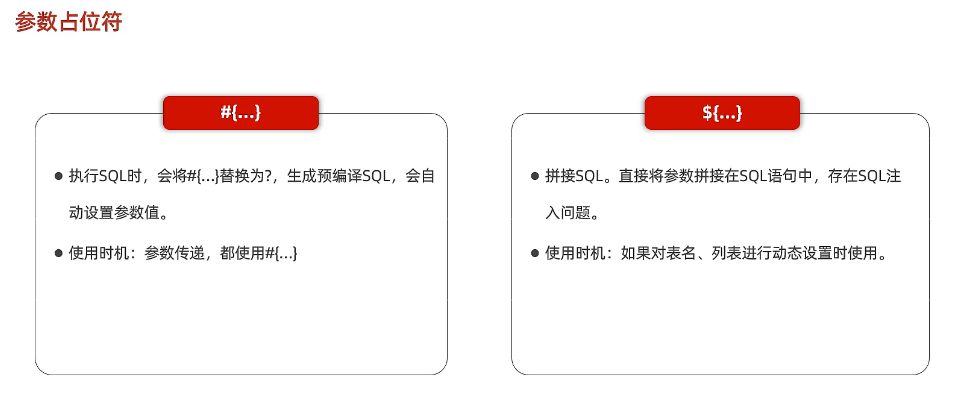

评论